Retrieve New Sourcebase Manufacturers and UMDNS Codes
Once all three steps of the ECRI Alert module setup and configuration have been completed, you can begin retrieving new Sourcebase and UMDNS codes for creating/editing Asset and Vendor records in TMS. (If all three steps in the module setup have not been completed, see the Setup and Configuration Overview topic and then proceed with completing any of the steps that have not yet been completed.)
Before you can use Sourcebase manufacturers and UMDNS codes in TMS, you must retrieve them for the first time. This is accomplished in three steps that can be repeated at any time.
To retrieve new sourcebase manufacturers, follow these steps:
- Go to Tools > Partners > ECRI > Check for UMDNS and Sourcebase Code Updates
-
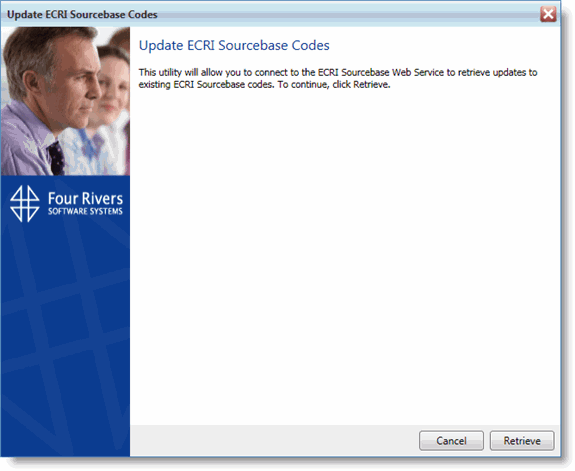
You are presented with the Retrieving ECRI Sourcebase Updates wizard
-
Click Retrieve
-
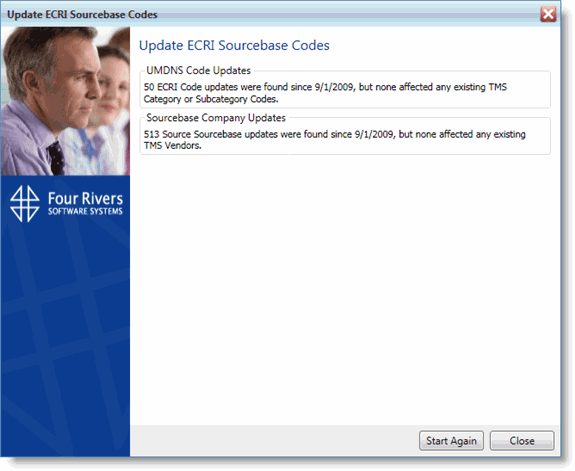
You will be shown the results of the update. If this is the first time you have retrieved Sourcebase and UMDNS codes, the new codes will not have any affect on existing Asset and Vendor records in your TMS database, but if you already have records setup with existing Sourcebase and UMDNS codes, those records that are affected by the update will be listed
-
Click Close if you are done, or you can click Start Again to restart the process
Once the TMS database has been updated with Sourcebase manufacturers and UMDNS codes, you can begin using these in the Assets and Vendors modules. New assets can be created with the Sourcebase manufacturers and UMDNS codes, as well as you can update existing assets in the system. You can also create vendors directly from Sourcebase manufacturers.
Proceed to the Using Sourcebase Manufacturers in Assets topic to learn about creating and modifying assets with the Sourcebase manufacturer codes you just retrieved.