Frequently Asked Questions
-
Why isn't the dashboard showing the work orders / time charges / assets I expect?
This usually means that your data source is not set up correctly. It may be filtering on the wrong fields or pulling data from the wrong tables. Refer to the documentation on data sources for more specific instructions.
-
Why can't I click the blue gear wheel to edit the dashboard or widget? Why is it grayed out?
If you can't click the blue gear wheel, you have not been given the permission to modify / edit the dashboard. You can either ask the dashboard owner to grant permission or create you own dashboard based on the existing one. For more information refer to Dashboard Permissions.
-
Why does another user's dashboard load when I log in?
This usually means that your defaults have been set incorrectly. Select the correct dashboard from the Form dropdown and then click Is Default to set it as your default dashboard.
-
I set my default dashboard, but it still loads the wrong one when I log in.
If you still directed to the incorrect dashboard, your dashboard may have been created in the wrong segment. To verify this, an administrator will need to navigate to Setup > Form Manager. Then select the appropriate Segment and Module options. If the dashboard does not appear in your default segment, you will need to create a copy of your dashboard in the correct segment.
-
Why does the system crash when I go to the Dashboard module?
If you have lost View permission on your default dashboard, the system will eject you and shut down when you try to access it. This may also indicate that you have lost access to a segment. Contact TMS support at 1-512-861-0726 for assistance.
-
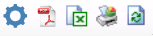
What do the icons in the widget mean?
From left to right, the icons stand for Properties, Preview Report (generates pdf without the chart), Export Report Data to Excel (generates excel files without the chart), Print Chart, Refresh Now.