Accruent RedEye 23.22.0 Release Notes
We're delivering this automatic upgrade on March 24, 2026.
Bulk artefact linking (Cross-link)
With the Cross-link enhancement, you can link a collection of artefacts to each other in all directions and in a single action. This makes it easier to create fully connected sets of related artefacts, helping you avoid repetitive manual steps and navigate large document sets more efficiently.
With this enhancement, you choose one of the following options:
-
Link to primary: Links a collection of artefacts to the artefact from which the linking action is initiated. This option preserves the existing behavior.
-
Cross-link to all: Links all selected artefacts to each other in a single action.
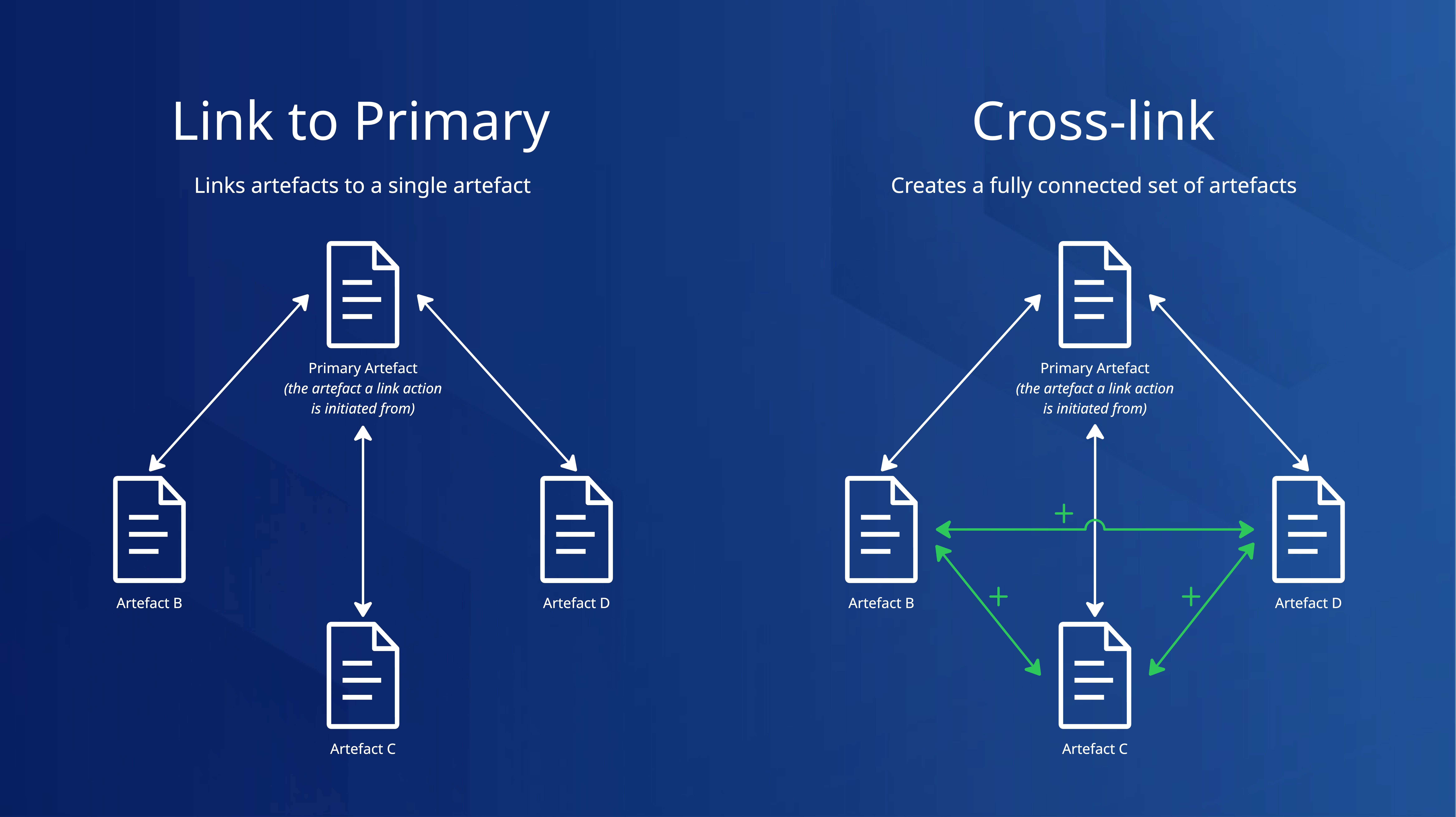
This release also includes UI improvements that enhance the experience in the Linked tab on the artefact page, the Link artefact search experience, and the collection views used during linking.
Artefact linking roles and permissions
As part of this release, the Cross-link to all option is limited to the following roles:
-
Partner
-
Bucket administrator
-
Group administrator
The Link to primary option remains available to other applicable roles by default.
Improved default metadata value handling during revision uploads
DEV-26579
We've improved the default metadata validation when uploading a new revision. The system now validates that the configured default value ID exactly matches the corresponding selection value ID. This change prevents default metadata values from disappearing when using the Upload New Revision or Update Current Revision tools.
Improvements and issues fixed
| Component | Summary | Reference # |
|---|---|---|
|
Deleted artefacts |
Workflow actions are now disabled for soft-deleted and consolidated (inactive) artefacts. |
DEV-25041 |
|
File preview |
XLS and XLSX files uploaded via Bulk CSV now render O365 previews correctly. |
DEV-22360 |
|
Reporting |
We've removed deleted group user roles from the Manage Bucket > Bucket Users > User List report. |
DEV-24942 |
|
Workflows |
Undo Workflow Step permission checks now correctly restrict the action to bucket and group administrators. |
DEV-26078 |
|
Upload V2 |
We've fixed DWG check-in failures caused by a 137 Signal 9 error. |
DEV-22217 |
|
Artefact numbering |
Child artefacts created via the public API now follow the configured custom number pattern. |
DEV-26519 |
|
Markup tool |
The Markup tool no longer remains interactive after submission. If you leave the tool in edit mode, presses Backspace while editing a comment, and submits the comment, the selected edit markup is no longer removed unintentionally. |
DEV-26930 |
|
Saved searches |
Shared saved search URLs now apply the correct operator for the creator when the bucket has the Include “AND” operator in every simple search query site option enabled. |
DEV-27164 |
|
DWG tools |
Disable the Zoom to Extents option when refreshing a DWG layout using the CAD > Refresh DWG Layout tool. |
DEV-27170 |
|
File handling |
We've prevented errors caused by uppercase file extensions when opening the artefact page. |
DEV-27554 |
|
Bulk CSV |
The file match pane now displays more than just the Artefact ID when you create placeholders and upload files during the Upload phase, making file matching easier. |
DEV-26406 |