Accruent Meridian Cloud 2024.3 Release Notes
We're delivering this automatic upgrade to UAT environments on December 5, 2024, and to production environments on February 5, 6, 7, and 10, 2025.
-
Meridian Portal: Send unchanged and released documents to Contractors, Document Controllers, Project Owners, and Contributors from Power to Portal. The new Rendition Information property set allows you to configure rendition settings for each document type, enhancing your experience in Meridian Portal. You can define properties such as sheet orientation, layout, and more.
-
Meridian Cloud API: Retrieve essential metadata from projects and document projects in Power, as well as from projects, packages, project documents, and package documents in Portal using the Meridian Reporting API and Portal Reporting API. This enhancement enables you to create dashboards in third-party systems, such as Power BI, offering valuable insights into project deliverables and progress.
-
Meridian Cloud Connector: Download the new Meridian Cloud Connector from the Landing page for improvements in site cache and local workspace capabilities.
-
Application Integration: Optimize your time with automatic site cache reconnection.
 Administration
Track document revision changes
MPS-55644
The audit log now registers changes to a document's revision number.
AutoCAD 2025 support
MPS-54976, MPS-55024
Currently, the integration with AutoCAD 2025 and AutoCAD-based applications such as Plant 3D and Civil 3D is not supported.
|
Summary |
Reference # |
|---|---|
|
We've updated the PDFTron viewer, which now supports viewing form fields. |
MPS-56207 |
|
The Adobe PDF IFilter was implemented to enhance the full-text search experience. |
MPS-58205 |
|
We've improved the performance of the MicroStation application link. You can now open MicroStation drawings with numerous references more quickly. |
MPS-56767 |
|
When you unlock a drawing document with multiple sheets in Meridian Power, the properties sync from MicroStation to Meridian based on the active sheet selected and closed earlier, rather than the document's last sheet. |
MPS-58382 |
Meridian Portal
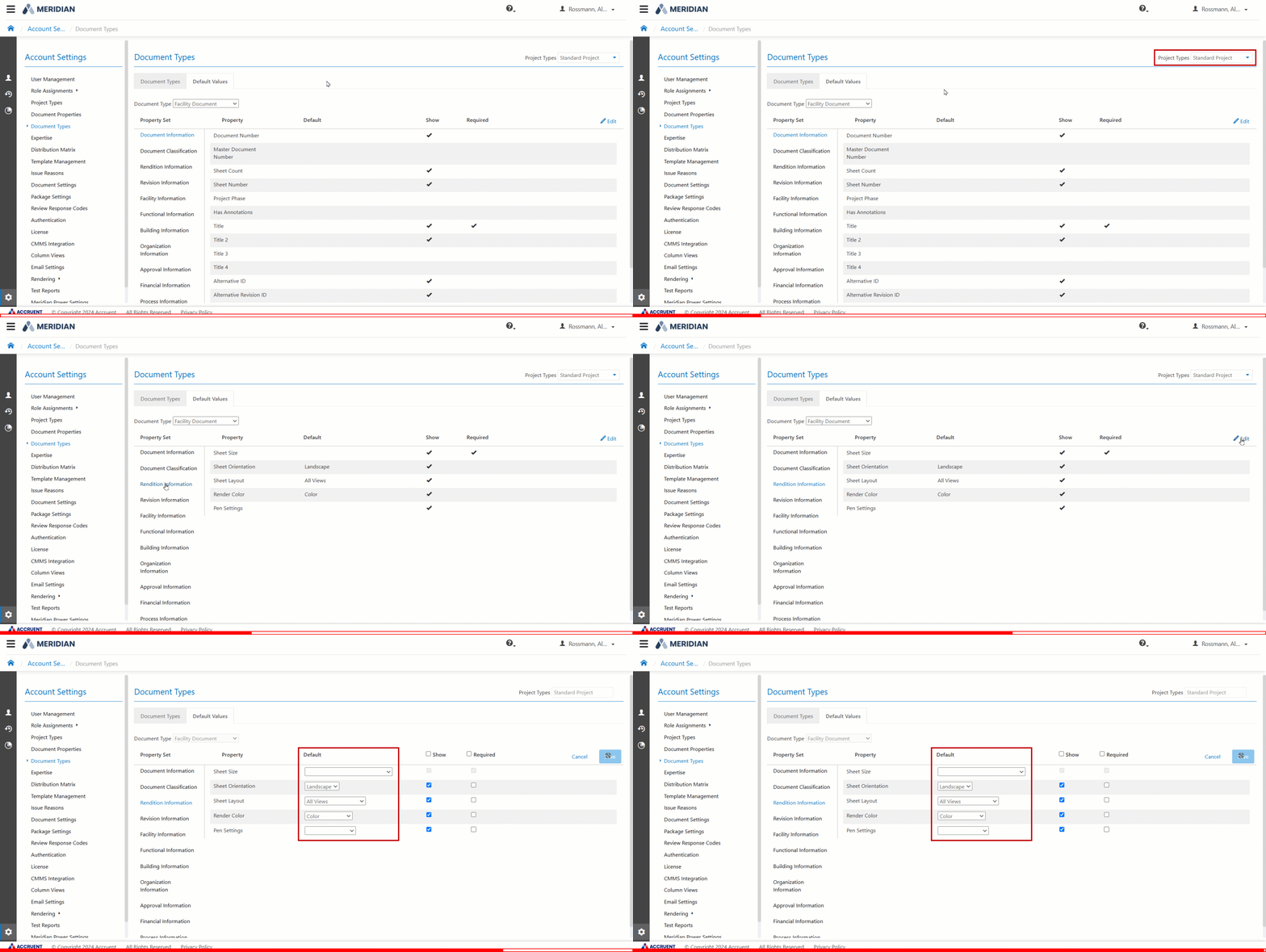
Configure renditions settings
MPS-56148
When uploading documents in the Meridian Portal, they now render according to the rendition settings defined in the Account Settings > Document Types > Default Values > Rendition Information properties. The Rendition Information property set allows you to configure rendition settings for each document type. You can configure the following rendition information:
-
Sheet size
-
Sheet orientation
-
Sheet layout
-
Render color
-
Pen settings
GIF image will display here
Improvements and issues fixed
|
Summary |
Reference # |
|---|---|
|
When you select For Information packages from the Meridian Portal dashboard, the system now correctly filters to show only the For Information packages. |
MPS-57093 |
Meridian Power
Send documents to Meridian Portal
MPS-50225, MPS-54633, MPS-56243
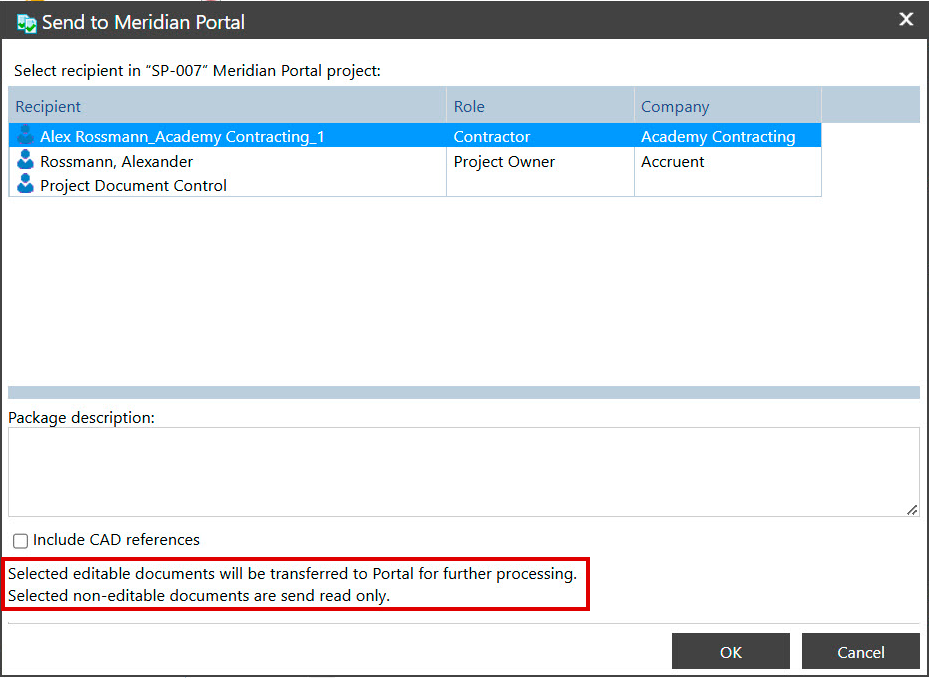
You can now send both editable and non-editable documents to the Meridian Portal.
-
Editable documents: Send editable documents For Revision to Contractors and For Routing to Document Controllers, Project Owners, and Contributors.
-
Non-editable documents: Send non-editable documents For Information to Contractors and As Released to Document Controllers, Project Owners, and Contributors.
Editable documents are documents with the status Under Change, while non-editable documents are those with the statuses Released or Unchanged, for example.
As part of this change, we removed the Purpose dropdown and the Latest released revision checkbox from the Send to Meridian Portal dialog.
PNG image will display here
Document revision numbering in data exchange
MPS-57404, MPS-55542
The system now updates document revision numbers during data exchange between Meridian Power and Meridian Portal.
When you send documents from Power to Portal, the system updates the revision number in Portal to match the Power's, and the document status in Power changes to Locked in Export Package. When sending documents from the Portal to Power, the revision number in Power is updated to match the Portal's, and the document status in the Portal changes to In Meridian.
Improvements and issues fixed
|
Summary |
Reference # |
|---|---|
|
We've added a limit of 10,000 documents when generating reports to streamline system performance. |
MPS-58204 |
|
Dialog pages now display at least three items in dropdown fields without requiring scrolling. |
MPS-54215 |
|
You can now correctly replace document content in Power by selecting a document and dragging another one from your computer over it while using site cache. |
MPS-54048 |
|
The text delimiter setting now works correctly for text reports that Meridian Power generates. |
MPS-54531 |
|
After replacing content, the uploaded file now automatically downloads to your local workspace. |
MPS-55264 |
|
When you attempt to expand folders with more than 3,000 documents, the Find Documents search appears, and results now include newly created documents when searching by name. |
MPS-51651 |
|
The Replace Content command from the ribbon menu now allows you to select a file from your device to replace content with. |
MPS-55888 |
|
Download to Local Workspace and Download as Archive options are now available if you enable site cache mode and select multiple documents to download. |
MPS-55584 |
|
Meridian Power now accurately records the user that changes a document in the Modified By field. |
MPS-55710 |
|
You can now access the list of master and project copies without access to the master document. |
MPS-56141 |
Application Integration
Meridian Cloud Connector
MPS-57784
Download the latest version of the Meridian Cloud Connector from the Landing page. This update features enhancements for application integration, site cache, and local workspace functionality.
Site cache connection
MPS-54901, MPS-54777, MPS-56128, MPS-49646
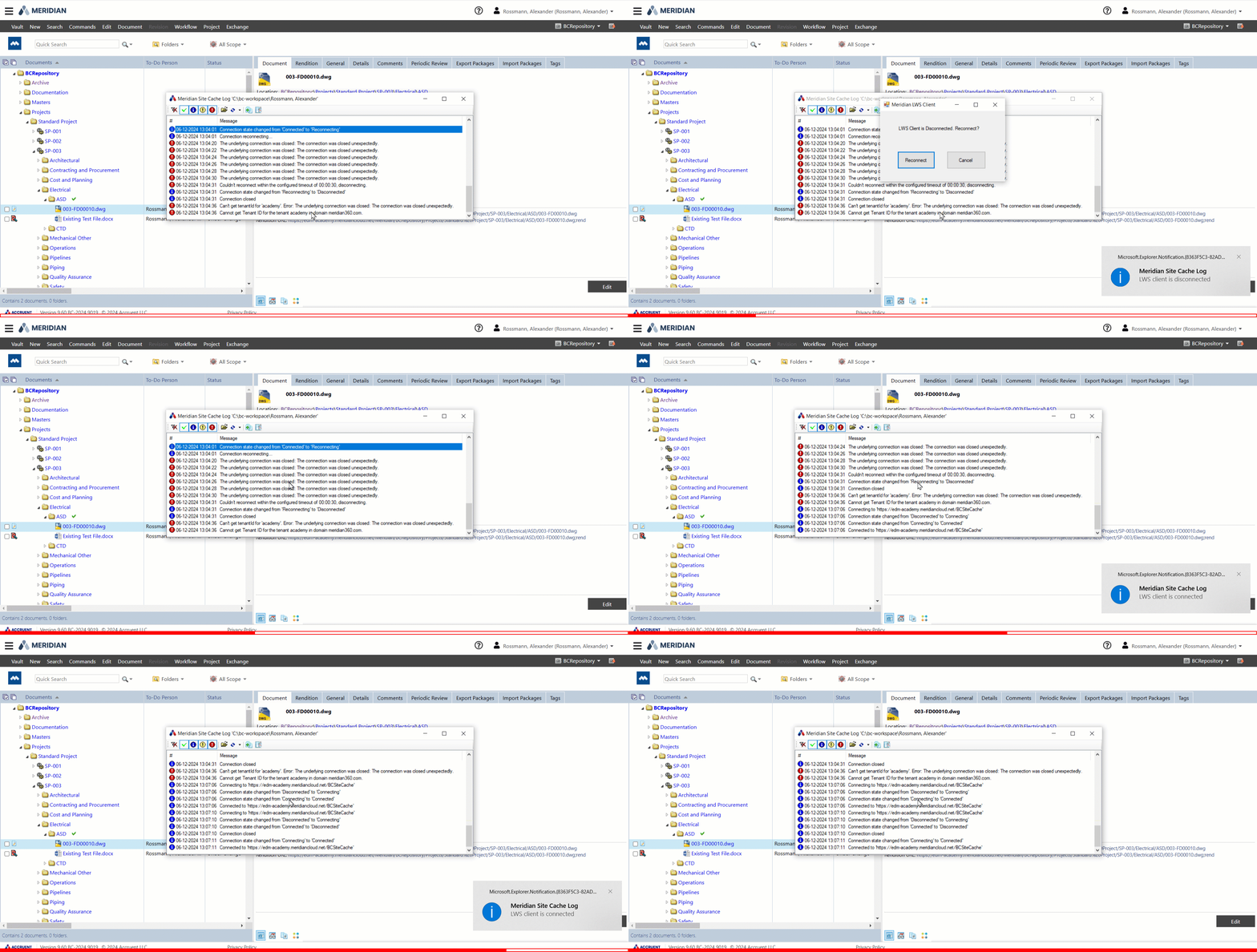
The site cache log now shows a warning message when the connection is lost and attempts to reconnect automatically. If the system fails to restore the connection after the configured number of retries, a dialog appears and allows you to reconnect manually. The site cache also reconnects automatically after you reboot the site cache server.
GIF image will display here
Navigation views
MPS-54204, MPS-54468, MPS-54050
Application integration now supports navigation views. The document you select remains selected when navigating to another view.
GIF image will display here
Improvements and issues fixed
| Summary |
Reference # |
|---|---|
|
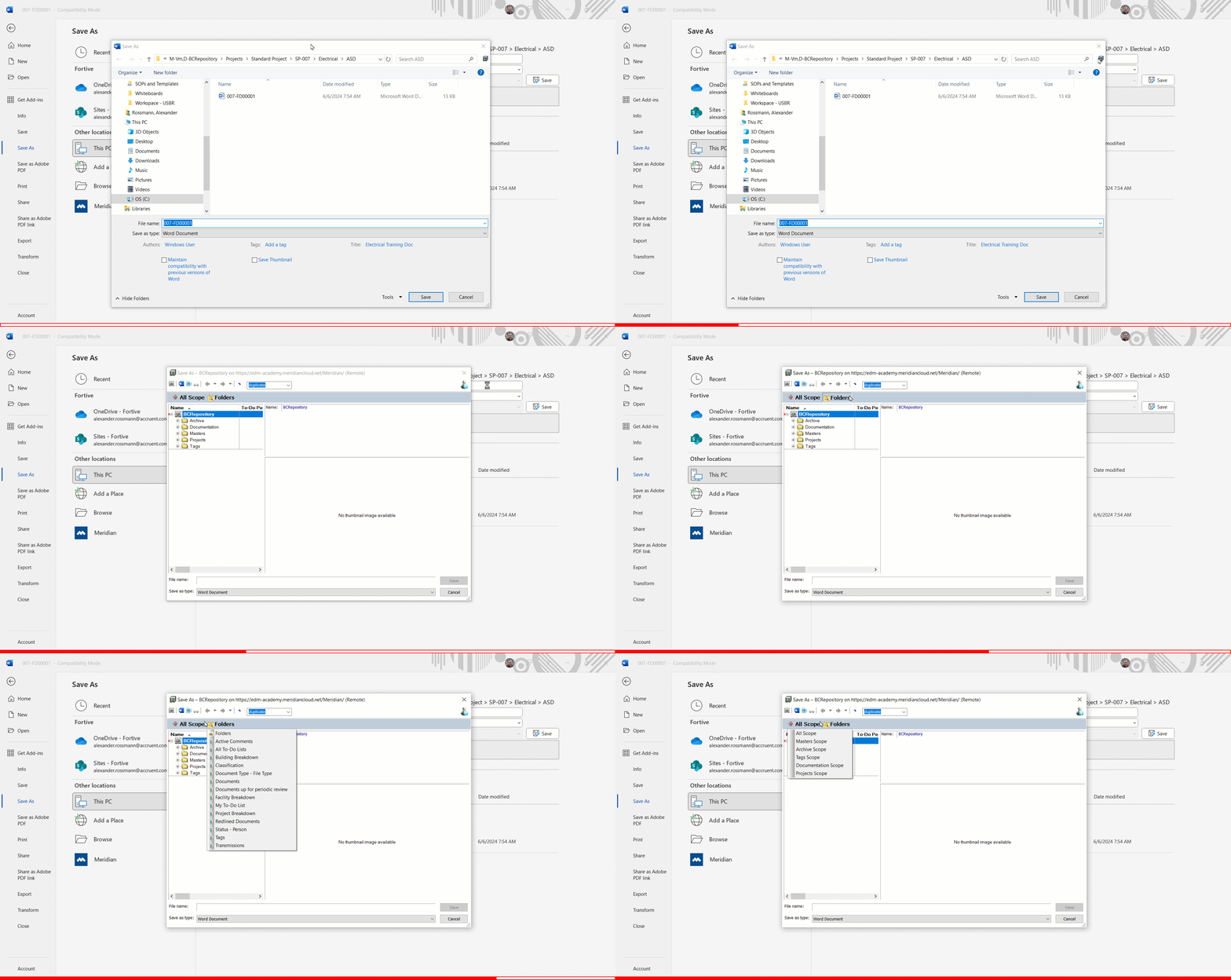
You can now search for documents using the Save As function in the vault using Application Integration. |
MPS-53806 MPS-49349 |
|
You can now configure the local workspace options to skip the synchronization of the local workspace if there are no updated files. |
MPS-52516 |
Meridian Cloud API
Portal Reporting API
MPS-57404
The Portal Reporting API allows you to retrieve project, package, project documents, and package documents metadata, with the ability to filter based on the modified date. This enhances project insights into deliverable, progress, and contractor performance.
Meridian Reporting API
MPS-53661
The Meridian Reporting API allows you to retrieve project documents metadata in Meridian Power. This streamlines insights into project progress and the on-time delivery of document.
