About the ECRI Alerts Tracker
Before we look at editing alerts in the ECRI Alerts module, we will discuss the ECRI Institute Alerts Tracker. The Alerts Tracker is ECRI’s Web-based alert management tool. TMS and the Alerts Tracker communicate back and forth with one another. You can use a combination of TMS and the Alerts Tracker to manage your ECRI Institute Alerts.
When you open the ECRI Alert Edit screen, you will notice that there is an Alert Details link on the Main tab, below the Accession Number field. Clicking on this link opens the alert in the ECRI Institute Alerts Tracker.
In the ECRI Institute Alerts Tracker, you can view the complete alert text, including the following:
-
The product classification information already displayed in TMS
-
A detailed description of the problem
-
Recommended remedial actions
-
Suggested distribution categories
-
Source documents via hyperlink or download
You can also collaborate with other individuals who use the ECRI Institute Alerts Tracker, even if they are not TMS users.
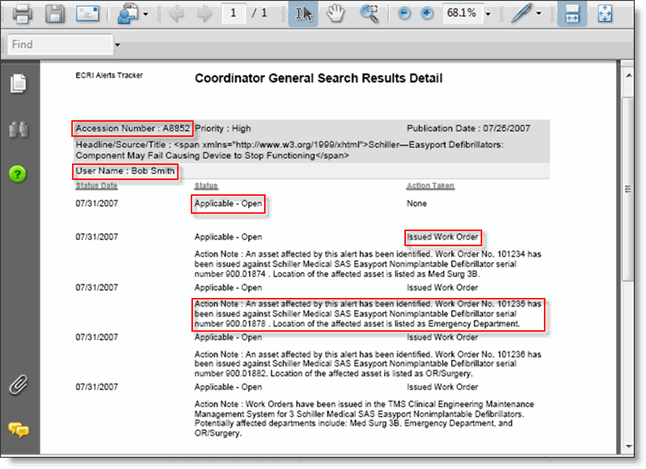
When work orders are created in TMS in response to an ECRI alert, TMS sends the following information to the ECRI Institute Alerts Tracker:
-
Accession Number
-
The ECRI Institute user ID of the TMS user who created the recall response work order
-
Alert Status (Applicable – Open)
-
Action Taken (Issued Work Order)
-
Action notes. For example: "An asset affected by this alert has been identified. Work Order No. 101235 has been issued against Schiller Medical SAS Easyport Nonimplantable Defibrillator serial number 900.01874. Location of the affected asset is listed as Emergency Department."
The screen shot below shows the Alerts Tracker General Report with work order entries from TMS.