Add Fields to a Dispatch Form
On the Form Designer Edit screen, you can add fields as single fields or as a group of fields. Follow the steps below for the method you want to use.
Add a Field
To add a field, follow these steps:
-
Click the arrow next to the Groups/Fields section on the right side of the screen to expand the list of field groups
-
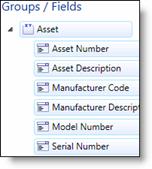
Select the arrow next to a field group to expand it
-
Drag and drop the field you need onto the form and place it where it is needed
-
Repeat steps 2 and 3 until you have placed all of the single fields you need on the form
-
Click Save
Add a Field Group
To add a field group, follow these steps:
-
Click the arrow next to the Groups/Fields section on the right side of the screen to expand the list of field groups
-
Drag and drop the field group you need onto the form and place it where it is needed
-
Repeat steps 2 until you have placed all of the single fields you need on the form
-
Click Save