Create a New Dashboard
New dashboards can be created based on an existing dashboard or as a new empty dashboard. There is no limit to the number of dashboards that can be created.
To create a new dashboard, follow these steps:
-
If you're already in Dashboard, click New in the Dashboard window, or go to Setup > Dashboard > New.
-
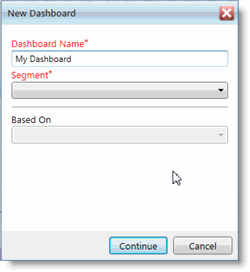
In the New Dashboard pop-up window, enter a Dashboard Name for the new dashboard.
-
Select the Segment in which the new dashboard will appear.
-
If you want to base the new dashboard on an existing dashboard and then adjust the dashboard for your own purposes, select a dashboard from the Based On list.
- Select Continue.
Your new dashboard is opened in the Dashboard Designer.
If you selected an existing dashboard in step 4 above, your new dashboard loads with all the widgets from the original dashboard.
See the Customizing a Dashboard section for how-to topics on making changes and additions to your dashboard.