TMS Today Screen
The TMS Today screen contains all of the information related to your work for the day, including:
-
The current date
-
The resource name associated with the user who is logged in
-
The number of active work orders assigned to the logged-in user
-
The total amount of time charged by the user in the past 24 hours
-
The Scan and Go field
Below this, you will see links to the modules that are accessible to you in TMS Anywhere. The links shown are based on the settings in the Configuration Utility ( see the TMS Anywhere Administration section for more information about this utility). See the topics that continue for instructions on how to use the available modules.
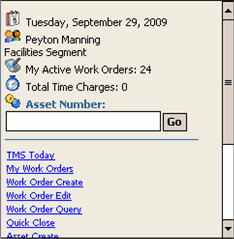
In addition to the module links, there are also links for Change Segment, Change Resource, About, and Logout. See the descriptions below for information on these functions.
Change Segment
The Change Segment link takes you to a Segment drop-down menu, where you can select a different segment to pull work orders, assets from. Simply select the segment you want to be logged into and click OK.
The segments you have access to in the drop-down menu are dependent upon your segment permissions in the main TMS application.
Change Resource
With the Change Resource link, you can select a different Resource to associate with your username. Simply select the resource you want to associate with your username and click OK. (Clicking OK also serves to exit you from this screen in the event that you do not want to change your username).
Any changes to the resource tied to your username in TMS Anywhere is reflected in the main TMS application as well.
About
The About link takes you to the About screen, which contains the application version, name of your organization as it has been set up in the Configuration Utility, information about Four Rivers Software Systems, and support information.
Logout
This link will log you out of the TMS Anywhere add-on module.