Asset Sweep
The Asset Sweep module helps you manually locate your assets. Asset Sweep is designed for use with a barcode scanner, although you can also enter assets manually.
To use Asset Sweep, follow these steps:
-
On the TMS Today screen, click Asset Sweep.
-
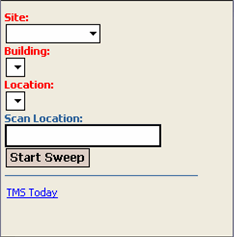
In the Asset Sweep screen, select Site, Building, and Location from the drop-down menus.
-
Click Start Sweep. At this point the screen changes and a Scan Asset field is available to you.
-
Use your barcode reader to scan your asset now. Or, you can enter the asset's number manually.
-
Click Go.
-
If the asset is found, its Asset Number and Description are displayed at the bottom of the screen. The asset record will be updated with the Site, Building, and Location values that are displayed at the top of the screen.
-
Repeat steps 1 through 6 until you are finished with your asset sweep.
-
Click End Sweep to complete the process.