Accruent Siterra 25.5 Release Notes
We're delivering this automatic upgrade to UAT environments on September 18, 2025 and to production environments on October 11, 2025.
Release notes are subject to change until the production release.
Character counts in notes fields and large text attributes
SP-58182, SP-58184
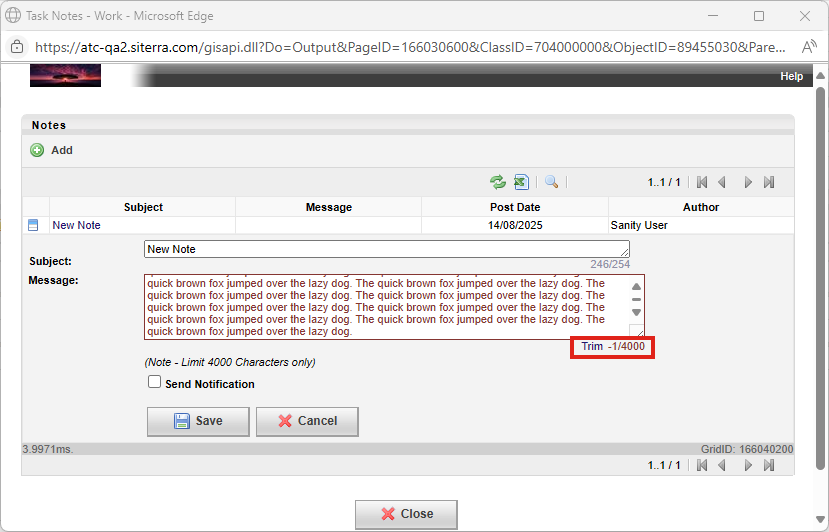
We've added a new live character counter to Notes fields across Search Ring, Site, Asset, Projects, Project Tasks, and Project Subtasks, including Text and Large Text extended attributes.
The new character count and limit in the lower-right corner of text entry fields applies to notes in all long-form text-based fields in all views, providing immediate visual feedback on character limits when entering data. This ensures the integrity of your data, preventing truncation of the notes you enter. Character limits vary by text field type.
The number of characters entered and remaining for the field is indicated. Exceeding the character limit turns the field border red. If this occurs, edit the field to meet the character limit, or click Trim to truncate the data instantly.
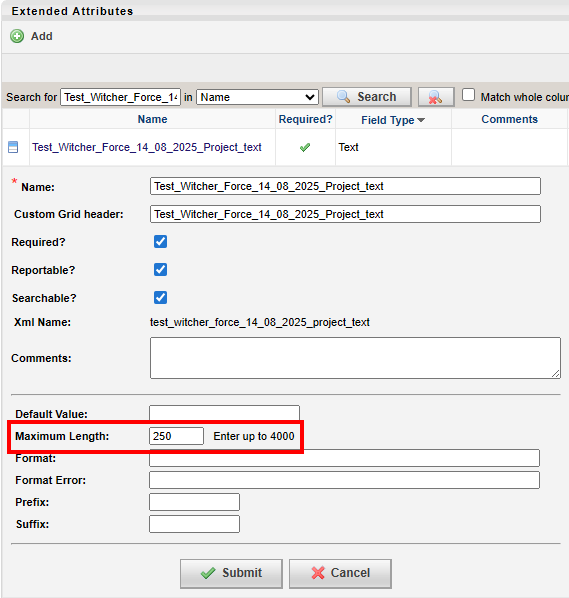
Siterra Administrators can create an extended attribute with a custom character limit up to the default of 4,000 characters by entering the Maximum Length.
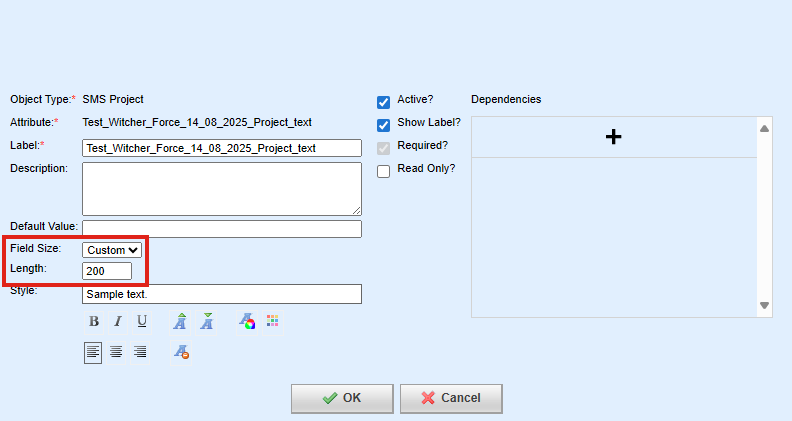
Setting a Length when adding or editing a form takes precedence over any extended attribute limit.
Single Sign-On
SP-57903 SP-58158
Siterra is migrating away from its use of Accruent Central Authentication (Central Auth) services for supporting Single Sign-On (SSO) and transitioning to Auth0 authentication services.
If your organization uses Single Sign-On (SSO), Siterra can now use Auth 0 instead of other SSO vendors such as Accruent Central Auth v2, Central Auth v3, or the legacy IS3 service.
If your user is configured correctly to use SSO you can use your organization's SSO provider to sign in:
-
On the Siterra Sign-on page, click SSO Sign-in.
If you are not signed in to your organization's SSO provider, their sign-on page displays.
-
If prompted, sign-in using your credentials for your organization's SSO provider.
Enhanced Security for Secret Questions and Answers
SP-57585
We have improved the security of secret question and answer text for Siterra username and password authentication. The text is now encrypted when you create or edit a security question or answer.
ExecuteImport REST API
SP-57146
To close the gap between our SOAP and RESTful APIs, Siterra API users can now use the REST version of the ExecuteImport API and benefit from the same features and performance as the ExecuteImport SOAP API. For example:
POST {{fullyQualifiedDomainName}} {{baseApiPath}} /SupportFunctions/v1/Imports/execute
Improvements and issues fixed
|
Component |
Summary |
Reference # |
|---|---|---|
|
Revision module |
You can now add additional tasks and subtasks to an open revision. For example:
|
SP-58330 01724379
|
|
Project Tracker |
When you update dates such as forecast dates in bulk using the Upload Directly option in Project Tracker, the dates now upload correctly:
|
SP-58393 01736472 01706425 |
|
Microstrategy Report |
When you add the core field Escalation Manual Adjustment Index to the Payment Escalation Information report, a text representation of each code displays instead of numeric values. |
SP-55735 01609919 01599616 |