HTML5 Skin Elements
This page shows the different elements of the new HTML5 skin.
There are some styles which you should NOT use in your project. These are styles which are specific to elements of the HTML5 output.
Do not use the following styles:
-
div#pagination
-
div.body-container
-
div.button-group-container-left
-
div.contentBody
-
div.feedback_survey
-
div.feedback-option
-
div.feedback-reason
-
div.logo-wrapper
-
div.MCBreadcrumbsBox_0
-
div.MCPopupContainer
-
div.nocontent
-
div.off-canvas-content.inner-wrap
-
div.Responsive_Footer
-
p.feedback-question
 Div Classes
This is a note. It is a div class. You can include text, ordered lists, bulleted lists, and images in notes. You can nest notes within other elements such as ordered lists, bulleted lists, tables, and other divs.
DO NOT select the div classes from the Styles window. They will be formatted incorrectly. Follow the procedures below.
To create a note, follow the steps below:
-
Write your note.
-
Select the elements of your note.
You can include text, ordered lists, bulleted lists, and images in notes.
-
Click the Group button
 in the Paragraph section of the Home tab.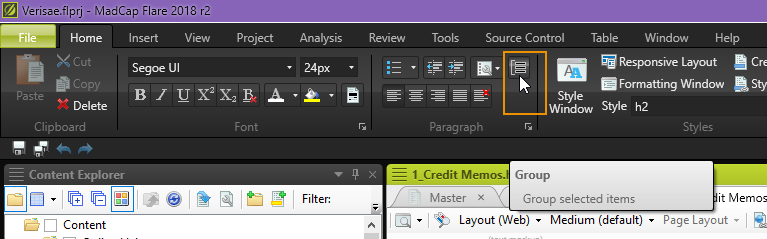
-
Select div.Note from the Create Group modal window.
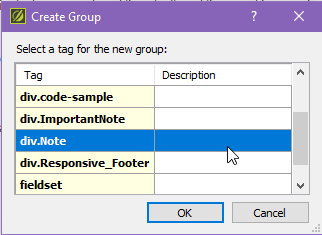
-
Click OK.
Your note is inserted in your topic.
This is an important note. It is a div class. Use this note style sparingly—it should be used to convey important information or warnings. You can select this note style in the same way as you would a regular note, except select div.ImportantNote in step 4 of the procedures above.
This is our code sample div. Use this class to apply formatting to a group of pre class lines.
Tables
| Column 1 | Column 2 |
|---|---|
|
This is our alternating row table class. The class name is Border_table_alternate_colors . Note: This table has a 1000px width applied, but the width is not applied by default.
|
|
| Column 1 | Column 2 |
|---|---|
|
This is our single-color table class. The class name is Border_table. Note: This table has a 1000px width applied, but the width is not applied by default.
|
|
Image Classes
There are several image classes to use.
| Class Name | Class Properties |
|---|---|
| img |
|
| img.padding_only |
|
| img.border_only |
|
| img.padding_and_border |
|
| img.popup_with_padding_and_border |
|
| img.popup_with_padding_only |
|
| img.popup_nopadding_withborder |
|
| img.resize80_noborder_nopadding |
|
| img.resize80_noborder_padding |
|
| img.resize80_border_nopadding |
|
| img.resize80_border_and_padding |
|
| img.resize80_popup_padding_border |
|
| img.hyperlink_with_padding_and_border |
|
| img.imgBorderMax520 |
|
Text Classes
| Class Name | Preview | Class Properties / Usage |
|---|---|---|
| p.Caption |
Text |
|
|
p.bold .bold |
Text |
|
|
span.ui .ui |
Text |
|
| span.italics | Text |
|
|
span.line span.line2 span.line3 |
N/A |
|
| span.ordinal | Text |
|
| p.title_footer |
Text |
|
| p.PageFooter |
Text |
|
| p.indent_14 |
Text |
|
| p.indent_3em |
Text |
|
| p.indent_28 |
Text |
|
|
pre |
Text |
|
| b.OptionalFeatureOnly | N/A |
Important!
Do not use this class. This is a class specific to the 360Facility Flare project. |
| p.feedback-question | N/A |
Important!
Do not use this class. This is a class specific to the Feedback Survey. |