Accruent Meridian Cloud 2025.3 Release Notes
We're delivering this automatic upgrade to production environments on August 25, 26, 27, 28, and 31, with the following highlights:
-
AutoCAD 2026: Use the AutoCAD 2026 add-ins.
-
Manual renditions: Disable automatic renditions to preserve your manually attached files for selected documents.
-
Favorites ribbon: Access your most-used sections with the new Favorites ribbon.
-
Explorer annotations: View Meridian Cloud Explorer annotations in Power to speed your workflow.
-
Recent documents: Access recent documents with one click to return to your work faster.
-
Assembly resolution: Resolve assembly components stored anywhere in the vault.
Meridian Power
Disable automatic renditions
MPS-56984
Disable automatic renditions to keep your manually attached renditions unchanged. This prevents Meridian Power from replacing your uploaded rendition during workflow changes.
When you select a manual rendition for a document:
-
Meridian applies watermarks during workflow state changes.
-
Meridian does not update title blocks.
-
You must attach an up-to-date rendition before moving the document forward in the workflow.
-
The workflow transition fails if the rendition is not current.
Favorites ribbon
MPS-59385
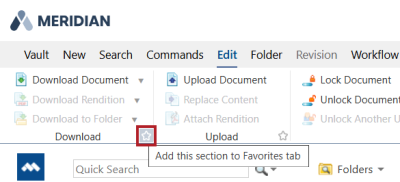
Access your most-used sections with the new Favorites ribbon. Click the star icon in each section you want to include in the Favorites ribbon.
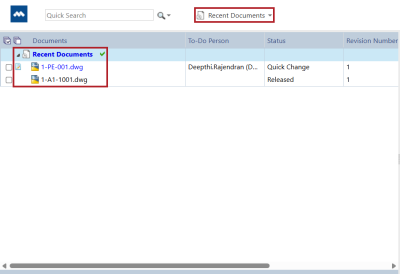
List of recently viewed documents
MPS-60963
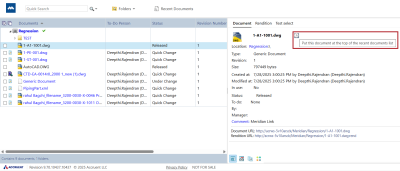
You can now access up to 30 documents in the Recent Documents navigation view, making it easier to return to your work. To add an item, click the clock icon next to the file name in the Document tab. To open the list, select Recent Documents in the navigation toolbar.
| Summary |
Reference # |
|---|---|
|
We've refreshed the look of the menu ribbon and property page tabs. |
MPS-60960 |
|
If you pin the ribbon, Meridian now keeps your selected tab active after you refresh the page. |
MPS-61384 |
|
You can now hide status icons in document lists to reduce visual clutter. The icon appears when you hover over a row, allowing you to view the status only when needed. In your Personal Preferences, select Hide status icons in lists. |
MPS-60961 |
|
When you unlock a MicroStation drawing in Meridian Power, it now syncs properties based on the active sheet you last closed. It no longer defaults to the last sheet in the document. |
MPS-57920 |
|
The Replace content and rendition command now works as expected when you drag a new drawing and PDF file over an existing document in Power. |
MPS-58986 |
|
When you edit the Memo field of a Word document in Meridian Power, the formatting now syncs with Microsoft Word. |
MPS-58777 |
|
Meridian Power no longer supports Edge in IE mode following the interface modernization. |
MPS-61498 |
|
View Meridian Cloud Explorer annotations directly in Power. When you select a document in Masters or Documentation, click the Comments tab to view the Cloud Explorer annotations. |
MPS-62677 MPS-55600 |
|
Document content search now works as expected with Microsoft Office files. Meridian Power returns documents that match the content of your search. |
MRS-907 |
|
When you use the Set Property Value command, Meridian now applies restrictions to property values for users who do not have administrative privileges. |
MPS-53744 |
|
Meridian now displays the correct rendition when you revert a document to a previous revision. |
MRS-14684 |
Application Integration
| Summary |
Reference # |
|---|---|
|
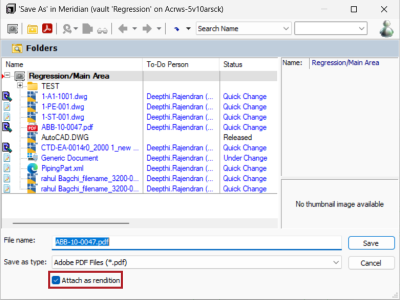
In remote or online mode, you can now attach a rendition from the Save as dialog. This allows you to keep the native document content instead of replacing it. To do this, first save the rendition to your local workspace (LWS). In the Save as dialog, select Attach as rendition.
|
MPS-59694
|
|
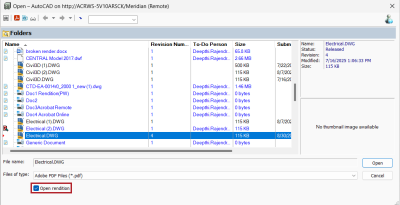
You can now open renditions instead of the native document content from the Open dialog in Application Integration when in remote or online mode. To do this, ensure the rendition is syncd to your local workspace (LWS). In the Open dialog, select Open rendition. Meridian disables this option for PDF documents.
|
MPS-59438 MPS-57358 |
|
The Connect to PowerWeb button now works as expected when you open a document in Application Integration. |
MPS-59640 |
Application Links
AutoCAD 2026
MPS-63943
The Meridian add-ins are now available for AutoCAD 2026.
AutoCAD Family 2025 Support
MPS-55021, MPS-55020, MPS-55026, MPS-55017
Meridian now integrates with AutoCAD 2025 and its specialized toolsets, including Electrical, Map 3D, Civil 3D, and RealDWG.
Improvements and issues fixed
| Summary |
Reference # |
|---|---|
|
In Application Integration, the search field keeps the term you previously entered but doesn’t run the search until you press Enter. This reduces load times and lets you change the search term before executing the search. |
MPS-64046 |
|
When you create a new document from Application Integration, authentication might fail when the wizard displays. This failure depends on the identity provider used and the internet and browser settings on the workstation.
|
MPS-66001 |
Meridian Administration
|
Component |
Summary |
Reference # |
|---|---|---|
|
API |
Use the new Get metadata API method to retrieve metadata for the current version of a document. Endpoint: GET edmsapi/v1/items/<id>/metadata?properties =<properties> Parameters:
|
MPS-57836 |
|
API |
The Masters API now includes the following enhancements: New optional parameters
New Meridian system properties
Lookup and hierarchy code valuesThe API now returns additional entries for the code value of lookup and hierarchy properties in the properties collection. These values use the _Code suffix in the property name. Updated ModifiedOn behavior
|
MPS-63840 MPS-65267 |
|
Import Profile |
When you import new file system documents an error no longer occurs when Meridian scans the package using Import Profile. |
MPS-61090 |
|
Viewer |
The viewer no longer supports text search when you compare documents or revisions. |
MPS-63116 |
|
Viewer |
Meridian viewers now display comments in renditions correctly for all documents. Previously, the viewer wasn't displaying all comments for specific documents. |
MPS-62444 |
Known issues
|
Component |
Summary |
Reference # |
|---|---|---|
|
Meridian Power |
Meridian now displays an error when you replace the content of an existing hybrid part while site cache mode is active. Workaround:
|
MRS-614 |
|
Meridian Power |
When you disable automatic renditions for a document, replacing the content still updates the Rendition updated at timestamp. Consequently, the system does not warn you if the rendition is outdated during the next workflow transition. |
MRS-14728 |
|
Meridian Power |
When you disable automatic rendition for a document, reverting to a previous revision displays an incorrect rendition. Always update the rendition after reverting to a previous revision and before you progress the workflow. |
MRS-14684 |
|
Application Integration |
When you save a rendition from Application integration, the dialog only displays PDF documents. To resolve this, drag the PDF file and drop it onto the document, then select Attach as rendition. |
MRS-14767 |
|
Application Integration |
Authentication might fail when the wizard appears in Application integration. This depends on your identity provider and your workstation's browser settings.
|
MRS-66001 |
|
Meridian Administration |
When you re-enable automatic rendition for a document, the system does not create a new rendition immediately. To update the rendition, select Update in the Rendition section of the Document menu. |
MRS-14734 |