Using Gmail in Plain Text Mode for Work Order Updates
Replying to email notifications is useful for quickly making updates to work orders. However, if the response contains text formatting commonly associated with Rich Text formatting, the system may not be able to process the email correctly
Gmail, by default, uses Rich Text in composed emails. You must put Gmail in Plain Text mode for email updates to work properly.
- In Gmail, start to compose your message.
- Click the More options menu in the bottom right corner of the New Message window.
-
Select Plain text mode.
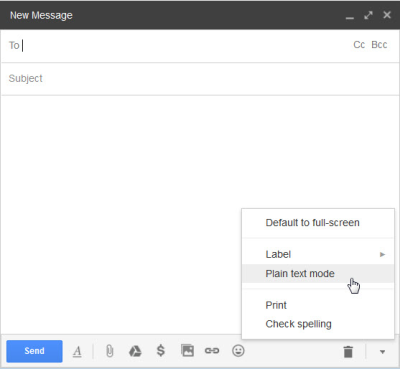
This setting will remain checked for all future Gmail messages.