User Cannot Generate a Schedule
If a user reports that he can create and define a schedule, but after clicking the Finish button, is not presented with an option to generate the schedule, it is most likely because he has not been granted the appropriate Schedule security rights.
Only system administrators can modify a user's security rights.
To enable the appropriate security rights:
-
Open the Administration Menu page.
-
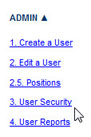
Under the ADMIN heading, click User Security.
-
Click SELECT USER.
-
Search for and select the name of the user whose security rights should be modified.
-
Scroll down to the Security Rights Settings pane and access the Schedule Security Rights section.

-
Select the Workloading check box.
-
Click the UPDATE button in the Security Rights Settings pane.
The user should now see the Generate button after he finishes defining the schedule.