Space Functional Category Associations
For installations using the Space module, you can now create associations between space types and space functional categories. Creating these associations can simplify the process of creating nested complex allocations by limiting users’ choices when nesting Space Category and Space Function complex allocations. This prevents users from making inappropriate nested complex allocations and makes selecting the proper type of allocation simpler by narrowing the list of options that are displayed in drop-down menus.
For example, you could create the following associations between space types and functional categories:
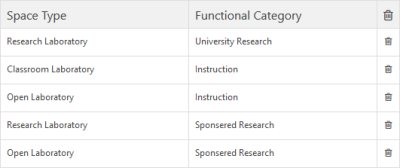
If you create a nested complex allocation for a space and make the first method layer a Space Function layer (which you specify as Sponsored Research), then when you nest a Space Category allocation beneath it, your only options when selecting the space type will be Open Laboratory or Research Laboratory.
These associations work in either direction. Using the above example, if you define a nested complex allocation and make the first method layer a Space Category layer (where you specify the space type as Research Laboratory), then when you nest a Space Function layer beneath it, your only options when selecting the functional category will be University Research or Sponsored Research.
While you can define space type and space functional category associations, the validation of these associations is not yet implemented and will be available in an upcoming release. For now, the associations can be made, but they will not yet restrict nested complex allocations.
To open the Space Functional Category Associations page:
-
Open the Administration Menu page.
-
Under the SPACE ADMIN heading, click Space Functional Category Associations .
-
Click the Space Type tab.
In a future release you will be able to create associations between departments and space functional categories as well.
 Search for Space Functional Category Associations
 icon to the right of the association. Deleting an association does not affect any existing nested complex allocations. If you want to reset the criteria and perform a different search, click the